
Traffic Court Records let Wichita drivers instantly see if a citation has been filed, the fine amount, and any pending DMV points. An online traffic court records lookup at the Sedgwick County Courthouse portal shows case number lookup, violation date, and charge description, while the traffic court docket search reveals scheduled hearings and hearing transcripts. For quick verification, the public access database also lists citation records, misdemeanor convictions, and outcome summary, all searchable during office hours at 525 N. Main St., 6th Floor, Wichita, KS 67203.
When you need a traffic court case status check, the portal provides a traffic court record request form, record download options, and a clear record privacy policy. Users can also explore traffic court arrest reports, DMV points inquiry, and conviction verification without hidden fees, as the site outlines any record retrieval fee up front. Helpful record search tips include confirming the citation number and using the case number lookup to avoid common search problems.
How to Search Traffic Court Records
Traffic Court Records are the online case entries for traffic citations and related court proceedings handled in Sedgwick County. A case search can help locate the case number, violation date, charge description, hearing schedule, docket history, filed documents, and final outcome. You can also access traffic ticket records to review official records. Use the official search as the first stop for a traffic court case status check, then use the records request process for documents that the online search does not supply. A case result may not settle payment, driver point, transcript, or certified-copy questions.
Official Search Portal: https://www.dc18.org/records
Steps to Search
- Open the official Records page and select the district court record search or case lookup option.
- Enter the case or docket number from the citation, appearance notice, or court filing. If that number is unknown, use the citation number, legal name, and violation date fields offered by the portal.
- Compare each result by case number, violation date, and charge description. If several records have the same name, treat them as separate cases until the matching citation is confirmed.
- Open the matching result to review scheduled hearings, docket entries, available documents, judicial actions, judgment, and case status.
- For a record that is not posted, use the official request form, select the needed document type, review the stated retrieval charge, and follow the delivery instructions before submitting the request.
What Sedgwick County Traffic Court Records Can Show
Each case page can present different fields based on the stage of the case and the documents filed. Some entries appear as a short status summary, while other cases contain a longer docket with court filings and hearing events. The fields below explain the most useful parts of a traffic case record.
A traffic court record contains details that help identify a case and follow its progress. The case or docket number identifies the court file, while the citation number refers to the number printed on the original traffic notice. The party name identifies the person involved, and the violation date shows when the alleged incident occurred.
The charge description explains the alleged traffic violation, while hearing details provide scheduled dates, times, and courtroom information. Docket entries show case activities, including filings, hearings, motions, payments, and court orders. Document links may provide access to available court filings and related documents.
The disposition and judgment show the court’s decision, plea result, fines, or other final actions. The case status indicates whether the matter is open, pending, or closed. Check the latest docket entries for updated information because case details and hearing dates may change.
An arrest report and a full hearing transcript are separate from the standard case docket. Law-enforcement reports belong to the agency that created them, and transcripts come from the court reporter’s record process. A docket entry can show that an arrest, hearing, or transcript request occurred without providing the complete underlying document.
Sedgwick County KS Traffic Court Records Search
The court’s online search is designed around case identifiers and party information. Reviewing the right identifier prevents many missing-result problems. Keep the citation or notice nearby, since it often contains the court name, case number, violation date, and scheduled appearance details.
Docket Number and Scheduled Hearings
A docket number or case number identifies the court file. Enter it without adding spaces or changing its format. If the search produces no match, check each character against the notice, since a transposed digit or missing zero can send the search to the wrong place. When the number is accepted, the result opens the case docket rather than a general party profile.
Scheduled-hearing entries can include the date, time, courtroom, and location. These details can change through a continuance, reassignment, or court order. The latest docket entry and the most recent hearing notice provide the strongest basis for planning an appearance.
Hearing Dates, Times, and Locations
Read the hearing entry as a schedule, not as proof that the hearing occurred. The later docket may record the result, a continuance, a remote appearance, or a new courtroom. If the page does not list a location, check the related order or notice before traveling to the courthouse.
Arrive with enough time for security screening and courthouse navigation. A scheduled time can change even when the online page has not yet refreshed, so recent filings and notices deserve careful review. If the matter has an immediate deadline, request case-specific confirmation from the court records office.
Docket Entries and Proceeding History
Docket entries place each case event in date order. They can show who filed something, what the filing requested, which judge ruled on it, and what action followed. A short summary may combine several steps, so open the full entry and any linked document when the wording matters.
The proceeding history also shows whether a case still has scheduled activity. Look at the newest entries first, then read backward for the filing that started the dispute. The final entry is not always the last word if a document, amended judgment, or correction was added later.
Traffic Court Proceedings
Traffic cases can move through several court stages, and the docket uses legal labels for each stage. Not every case contains every event. The entries below explain common stages and what their presence can tell you about the case.
Initial Appearance, Pleas, and Responses
An initial-appearance entry records the first listed appearance before the court or the judge. It may also note that a defendant appeared, failed to appear, or had counsel enter an appearance. The entry alone does not decide the case.
A plea or response entry shows how the party answered the charge. It may record a guilty plea, a not-guilty plea, a request for a trial, or a negotiated resolution approved by the court. Read the wording closely because “guilty,” “not guilty,” and “dismissed” have different legal effects.
Motions, Continuances, Hearings, and Trials
A motion asks the court to take a specific action. Common examples include requesting a hearing, changing a plea, continuing a scheduled appearance, or dismissing a charge. The docket normally pairs the motion with a response and the judge’s ruling.
A continuance postpones a hearing to a later date. A new date may appear in the same entry or in a later order. A hearing or trial entry can mark a scheduled event, a completed proceeding, or an action taken outside the courtroom. The surrounding entries show which meaning applies.
Judicial Actions
Judicial actions are decisions made by a judge, such as granting a continuance, accepting a plea, ruling on a motion, or entering judgment. Some judicial actions appear only as a brief docket note. A related order may contain the full reasoning, terms, or signature.
Compare the action with the filing it answers. A granted motion does not always decide the whole case, and a denied motion may lead to another hearing. The full sequence gives a clearer account than a single status label.
Traffic Court Documents
A docket entry is a record of an event. A document is the paper associated with that event, such as a motion, response, order, notice, or judgment. Not every entry has a posted document, and some documents may be viewable without a separate download option.
Filed Court Documents, Orders, and Hearing Notices
Filed documents can include pleadings, legal motions, responses, court orders, and hearing notices. An order may change a hearing date, decide a filing, approve a plea, or set case terms. Use the date attached to the document when deciding which version controls.
Hearing notices help confirm the date, time, and location of a scheduled appearance. A notice and the live docket can differ if a later order changes the schedule. Review both and place priority on the most recent court action.
Motions, Responses, and Case-Related Filings
A motion and its response often appear as consecutive entries. The motion states the requested action, the response addresses it, and the order shows the result. A filing without a visible document may have been submitted on paper, may have been removed, or may remain outside the online view.
Other case-related filings can include appearance notices, service records, proof of payment, exhibits, or stipulated resolutions. The exact set depends on the charge and the court’s procedures. The docket itself identifies the filing type and date even when an image is unavailable.
Judgment Documents and Hearing Transcripts
A judgment document states the final court decision, sentence, fine, costs, payment terms, or other ordered relief. You can also explore criminal court records through available county records. It is often more useful than a short case-status label for confirming the result. Read the judgment date and compare it with later docket entries for any amendment.
A hearing transcript is the official written record of a hearing. A docket entry labeled “hearing” or “transcript” does not always include the full transcript. If a proceeding needs a transcript, use the court’s transcript request process. A copy of the docket page and a transcript serve different purposes.
Traffic Court Case Dispositions
The disposition records how the court resolved the charge. A charge listed at the start of a case shows only what was alleged. The disposition and judgment show what the court decided. For conviction verification, rely on those final entries rather than the charge label.
Guilty and Not Guilty Dispositions
A guilty disposition may follow a guilty plea or a finding made after a hearing. The related judgment can state the fine, costs, suspension, or other terms. A not-guilty disposition records that the court did not find the defendant guilty of the charged offense following the proceeding.
Read the full wording because a case can contain more than one charge or disposition. A dismissed count does not cancel a guilty finding on another count. The judgment clarifies which counts remain open and which have final rulings.
Dismissal and Deferred Disposition
A dismissal ends a charge without a guilty finding. It may occur before trial, after a plea, by agreement, or through a court ruling. The docket may say whether the dismissal is with prejudice, which affects whether the same charge may be brought again.
A deferred disposition places the case on a track that depends on court-approved terms. The docket may later show successful completion, an amended disposition, or a judgment based on the terms. A deferral label should not be treated as a conviction or final judgment until the court records the final result.
Judgment and Case Closure
A judgment gives the legal result and any sentence or payment terms. The case-status field may then change to closed. Closing a case does not erase its docket; it normally marks the end of active court activity. Any later correction or reopening would appear as a new docket event.
A traffic violation history is best built from final entries rather than open charges alone. For each case, note the violation date, charge, disposition, judgment date, and any reported action. A misdemeanor conviction is verified by the final disposition and judgment language, not by the initial charge description.
Traffic Court Record History and Updates
A case record develops as events are filed, processed, and entered by the court. The history gives the best view of that sequence. It can also show when an event was entered, which may differ from the date on the related document.
Case Filing and Docket Activity
The first filing starts the visible case history and assigns the court identifiers. Later entries add responses, hearing records, rulings, payments, and judgments. Reviewing the newest entries first shows whether the case has recent activity or an action that needs attention.
Docket activity includes both party filings and court actions. A party can upload a document, but the court’s acceptance or ruling may appear later. The filing date, entry date, and hearing date can each serve a different purpose, so keep them separate.
New Documents, Changed Hearings, and Updated Dispositions
New documents and updated dispositions can appear after the case first appears in search. The online index may update on a different schedule from the clerk’s filing process. No posting time should be assumed unless the portal states one.
A rescheduled hearing may appear as a continuance, an order, or a new notice. Compare the date on each document. The newest signed court order or notice generally reflects the current schedule, even when an earlier docket entry still shows the former date.
Corrected Court Records
A correction may be entered as a later event rather than deleting the earlier entry. The correction can identify the affected filing, state the reason, and attach a corrected document or order. Review both the original and correction before relying on either version.
A web display can contain a typing or indexing error that differs from the court’s official file. The docket history and source documents help identify that problem. A correction request should target the exact entry rather than asking for a vague update to the whole case.
Traffic Court Record Availability
Online availability depends on the case type, age, filing status, and court restrictions. A search result can show the basic case history while omitting a document that is sealed, restricted, or not yet digitized. The chart below explains the common record categories.
Online Retention and Record Expiration
Do not assume that a court record expires online after a fixed number of days. Online indexing, file retention, sealing, expungement, and case closure are separate actions. A closed case can remain searchable for years, while a restricted or newly filed record can be absent from the search.
Removal from the online search does not prove that the physical court file was destroyed. Expungement or sealing requires formal action and may leave a case-history entry that states what occurred. Review the final docket and any relevant court order before treating a case as erased or eligible for expungement.
Traffic Court Fine Amount and Payment Status
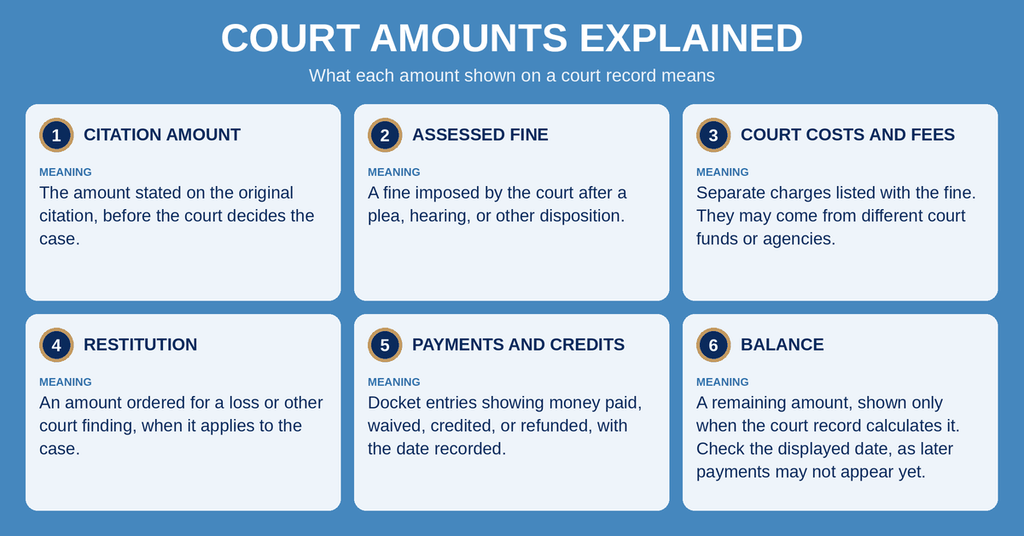
A fine amount shown in a traffic case can refer to different parts of the court action. Read the docket wording and judgment together. A case-status line alone does not prove that the full balance is paid or that every payment has posted.
DMV Points Inquiry
A traffic court case status check does not replace an official DMV points inquiry. A court docket can show a conviction, dismissal, or reporting entry, yet it may not list the full point total on a Kansas driver record. Use the Kansas Department of Revenue’s official driver-record service for driving points and license actions.
The court record and the state driving record update through separate processes. A disposition may later be reported to the state agency, and the two records can use different dates for the same action. Individuals can also check family court records to verify relevant details. For a license, insurance, or employment request, follow that agency’s rules for the type of record it requires.
Misdemeanor Convictions and Verification
A misdemeanor conviction appears through final court records, not simply through a search result that lists a misdemeanor charge. Review the disposition, plea or finding, and judgment together. If the result stops at the initial charge, it does not confirm a conviction.
An online docket can support conviction verification. Some agencies, employers, licensing boards, or insurers require a certified copy instead. The receiving agency should state whether a printed online page is acceptable or whether court certification is required.
Traffic Court Search Problems
Many missing cases result from a mismatched identifier, the wrong court system, or an online posting delay. Sedgwick County district court matters and Wichita Municipal Court matters sit in separate court systems. The court named on the citation or notice determines which records system should hold the case.
Traffic court searches may return incorrect or missing results for several reasons. If a case is not found, check the name, case number, citation number, court, and record category. An incorrect case number may contain a missing digit, omitted prefix, or leading zero. Citation numbers may also differ from court case numbers, so compare both identifiers with the original notice.
When a name produces multiple results, compare citation numbers, violation dates, and charge descriptions to identify the correct case. Recent filings may not appear immediately because the online index has not been updated. If the wrong court or jurisdiction is selected, use the court name printed on the citation to search the correct system.
Archived cases may require a direct request to the court, while sealed or restricted cases may have limited online information. For missing records, contact the appropriate court clerk and provide the available case details.
Traffic Court Record Copies, Requests, and Privacy
An online case view, a downloaded document, a certified case record, and an official transcript serve different needs. Choosing the right format before requesting a copy can prevent delays with another court, agency, employer, or insurer.
Record Request Form and Retrieval Fee
If a needed document is missing from the docket, use the official record request form shown through the Records page. Include the case number, party name, document type, date range, and delivery method where those fields appear. A precise request reduces the chance that staff must call for more case details.
Any record retrieval charge should appear on the official request screen before submission. Fees can differ by document type and service, so use the amount shown for the current request rather than a copied figure from another site. Review the accepted payment method, delivery choice, and processing statement on that screen before sending payment.
Third-party lookup and document-delivery sites may offer convenience, yet they do not replace the court’s official record. Their summaries can omit sealed filings, delayed entries, or document images. Verify any outcome against the court docket or a certified copy.
Record Downloads and Privacy Policy
Use a download link only when the portal provides one. A browser’s print or save command creates a local copy of the displayed page, but it does not make the document certified. Keep the court name, case number, docket page, and document date together so the copy remains identifiable.
Follow the privacy policy and terms posted through the official portal. Some case data may be visible, yet sealed documents, restricted filings, and masked personal identifiers receive different treatment. Avoid sharing full addresses, birth dates, signatures, or case files unless the receiving party needs them and the law permits the disclosure.
Traffic Court Record Correction Procedure
A wrong name, date, charge, or hearing entry can cause serious confusion. Corrections must match the court’s official file rather than a personal transcription. The record correction procedure separates simple data-entry errors from changes to a judge’s decision.
Identifying the Incorrect Entry
Save the page showing the error and note the date shown for the docket entry. Compare it with the citation, filed pleading, hearing notice, order, and judgment. Identify the exact incorrect text and state the correct text supported by the source document. A general complaint that a case is wrong is harder to correct than a request tied to one entry.
Submitting a Correction Request
Use the correction or amendment process posted by the court or records office. If the online records page does not contain a correction form, send a written request through the official records channel. Include the case number, party name, entry date, erroneous wording, requested wording, and a copy of the supporting filing. Do not edit the original document yourself.
Court Review and Record Change
Clerks may correct clear administrative errors, such as an obvious typographical mistake. Changes to a plea, hearing result, judgment, or other judicial action normally require action through a judge or court order. An approved correction may appear as a new docket entry with a note and supporting document. Keep both the original entry and the correction because the sequence shows what the court changed.
Send a possible error without delay if it affects an appeal, license, insurance, employment, or payment decision. An error on a third-party search page does not change the official court record until the court makes and records the correction.
Contact Information
Have the court case number, citation number, party name, and a clear description of the requested record ready when contacting the courthouse records office.
Frequently Asked Questions
Below are quick answers to common questions about finding, checking, and correcting Traffic Court Records in Sedgwick County.
How can I find traffic court records in Sedgwick County?
Start at the official Sedgwick County search portal at https://www.dc18.org/records. Enter the driver’s name, case number, or citation number to view basic details. The site shows the violation date, charge description, docket history, and hearing schedule. If the online view does not include full documents, submit a request using the Traffic Court Record Request Form. Bring a valid ID and the case number to the clerk’s office at 525 N. Main St., 6th Floor, Wichita, KS 67203, or call (316) 660-5900 during office hours.
What shows in an online traffic case status check?
The online status check displays the current docket entry, upcoming hearing date, and any pending motions. It also lists the fine amount, points that will be added to the driver’s license, and the outcome if the case is closed. Users can see a brief charge description and whether a judgment has been entered. For detailed documents such as the citation or hearing transcript, a formal record request is required.
How do I request a traffic citation record copy?
Complete the Traffic Court Record Request Form available on the county website or at the clerk’s office. Include the case number, your contact information, and a copy of a government‑issued ID. There is a small retrieval fee, typically paid by cash, check, or credit card. Submit the form in person or mail it to the Sedgwick County Courthouse. Processing usually takes 5‑7 business days, after which you can pick up the copy or receive it by mail.
Where can I see my traffic fine amount and DMV points?
The fine amount and point assessment appear on the online docket view after you locate the case. They are also listed on the citation notice sent by the court. If you need an official statement, request a traffic court record that includes the fine receipt and point summary. The Kansas DMV updates points within 48 hours of the court’s final judgment.
What steps fix an error in a traffic court record?
First, contact the clerk’s office at (316) 660-5900 to confirm the mistake. Then fill out the Traffic Court Record Correction Procedure form, attaching supporting documents such as a corrected citation or police report. Submit the form in person or via mail. The court reviews the request and, if approved, updates the record and issues a corrected copy. Expect a response within two weeks.